

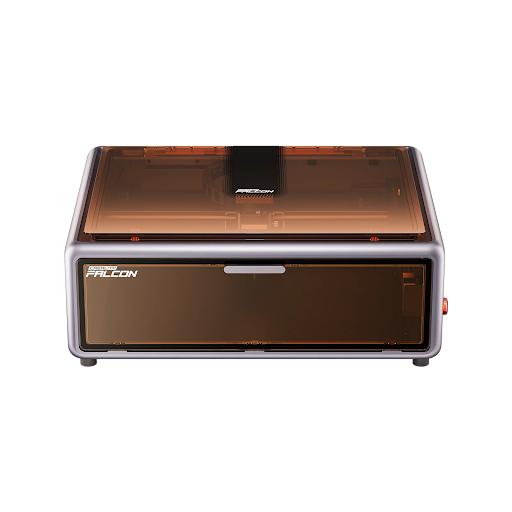
A Laser Cutter can cost anywhere from around $200 to over $5,000, depending on the laser type, power, safety design, working area, and intended use. Entry-level diode lasers are usually the most affordable choice for hobbyists. CO2 lasers cost more but are better for acrylic and thicker cutting. Fibre lasers are usually the most expensive and are mainly used for metal marking or industrial work.
How Much Is a Laser Cutter in 2026?
The cost of a laser cutter depends on what you want the machine to do.
A basic desktop diode laser for engraving wood, leather, paper, and small craft items can start from around $200 to $500.
A stronger diode laser or entry-level CO2 laser usually falls into the $500 to $1,500 range.
A professional CO2 laser, fibre laser, or larger production machine can cost $1,500 to $5,000+.
Prices can change because of promotions, bundles, shipping, accessories, and regional availability, so it is always best to check the official product page before buying.
| Laser cutter type | Typical price range | Best for |
| Basic diode laser | $200–$500 | Beginners, engraving, light crafts |
| Mid-range diode laser | $500–$1,500 | Small businesses, stronger wood cutting, craft production |
| Entry-level CO2 laser | $500–$1,500 | Acrylic, wood, leather, faster cutting |
| Professional CO2 laser | $1,500–$5,000+ | Signage, batch cutting, workshop production |
| Fibre laser | $1,500–$5,000+ | Metal marking, tools, jewellery, industrial parts |
What Determines the Cost of a Laser Cutter?
The price of a laser cutter is not only about the brand.
Laser source, wattage, enclosure, software, working area, and included accessories can all change the final cost.
A cheaper machine may look attractive at first, but you may need to buy an enclosure, air assist, honeycomb bed, exhaust fan, or safety glasses separately.
A more expensive enclosed model may cost more upfront, but it can be easier and safer to use indoors.
How Does Laser Type Affect the Price?
Laser type is one of the biggest cost factors.
Diode lasers are usually the most affordable. They are popular among beginners because they are compact, simple to maintain, and suitable for many craft materials.
CO2 lasers are more expensive, but they can cut clear acrylic and process organic materials faster than many diode lasers.
Fibre lasers are usually used for metal marking and industrial applications, so they tend to cost more and are not usually the first choice for general home crafting.
| Laser type | Price level | Best for | Main limitation |
| Diode laser | Low to mid | Wood, leather, paper, dark acrylic, engraving | Weak on clear acrylic and slower for thick cutting |
| CO2 laser | Mid to high | Clear acrylic, plywood, MDF, leather, signage | Needs more maintenance and ventilation |
| Fibre laser | High | Metal marking, tools, jewellery, industrial parts | Not ideal for wood or acrylic cutting |
How Does Laser Power Affect the Price?
Laser power also has a major impact on price.
A 5W or 10W diode laser is usually cheaper and works well for engraving or thin material cutting.
A 20W or 40W diode laser costs more, but it can cut faster and handle thicker wood more effectively.
For CO2 lasers, higher wattage usually means better cutting speed, larger machines, and higher overall cost.
| Power range | Typical use | Cost impact |
| 3W–6W diode | Small engraving, tags, coasters, light crafts | Lowest cost |
| 10W diode | Beginner engraving and light cutting | Affordable |
| 20W–40W diode | Better wood cutting and small business use | Mid-range |
| 40W–60W CO2 | Acrylic, wood, leather, signage | Mid to high |
| 80W+ CO2 or fibre | Production work, faster cutting, metal applications | Higher cost |
If you only want to engrave wood, leather, and gifts, you may not need the highest wattage.
If you want to cut thicker plywood, acrylic sheets, or run batch production, paying more for power and stability can be worthwhile.
How Do Safety Features Change the Price?
Safety design is another major price factor.
Open-frame machines are usually cheaper because they do not include a full protective enclosure.
Enclosed machines cost more, but they are easier to manage indoors because they help reduce laser exposure, smoke spread, and accidental contact with the laser beam.
For beginners, an enclosed laser cutter is often the better long-term choice, especially for home use, classrooms, or shared spaces.
| Safety feature | Why it affects cost |
| Enclosure | Adds material cost and improves safety control |
| Air assist | Improves cutting quality and reduces flare-up risk |
| Emergency stop | Adds safer operation control |
| Flame detection | Helps reduce fire risk |
| Built-in camera | Improves alignment and workflow |
| Fume extraction support | Makes indoor use easier and safer |
Laser Cutter Price Tiers in 2026
Laser cutters can be grouped into three practical price tiers: entry-level, mid-range, and pro-grade.
Each tier fits a different type of user.
| Price tier | Price range | Typical laser type | Best for | Typical materials |
| Entry-level | $200–$500 | 3W–10W diode | Beginners, hobbyists, small crafts | Thin wood, paper, leather, engraving |
| Mid-range | $500–$1,500 | 20W–40W diode, entry CO2 | Crafters, Etsy sellers, small businesses | Wood, leather, opaque acrylic, clear acrylic with CO2 |
| Pro-grade | $1,500–$5,000+ | CO2, fibre, higher-power systems | Workshops, signage, production, metal marking | Acrylic, plywood, MDF, metal marking, batch cutting |
What Can You Expect From a $200 to $500 Laser Cutter?
A laser cutter in the $200 to $500 range is usually an entry-level diode laser.
This type of machine is suitable for beginners who want to learn engraving, experiment with craft materials, or make small personalised products.
It can work well on wood, leather, paper, cardboard, and some coated surfaces.
However, most machines in this price range have limited cutting power and may not include a full enclosure, air assist, or honeycomb bed.
| What you usually get | What to watch out for |
| Basic diode laser module | Slower cutting speed |
| Small to medium working area | Limited material thickness |
| Good engraving ability | Often open-frame |
| Lower upfront cost | Accessories may cost extra |
| Beginner-friendly setup | Not ideal for clear acrylic |
This tier is best if you want to start learning without spending too much.
What Can You Expect From a $500 to $1,500 Laser Cutter?
The $500 to $1,500 range is often the best choice for serious hobbyists and small business users.
In this range, you can find stronger diode lasers, enclosed desktop machines, and some entry-level CO2 laser cutters.
These machines usually cut faster, offer better workflow features, and may include air assist, better software support, or safety improvements.
| What you usually get | Why it matters |
| 20W–40W diode options | Better cutting performance |
| Entry-level CO2 options | Better acrylic cutting |
| Enclosed designs on some models | Easier safety control |
| Better software compatibility | More efficient workflow |
| Larger working area | Supports bigger projects |
This is the most practical price range for users who want to sell products, make regular projects, or move beyond simple engraving.
What Can You Expect From a $1,500+ Laser Cutter?
Laser cutters above $1,500 are usually built for more serious production.
This includes larger CO2 machines, higher-power laser systems, and fibre lasers for metal marking.
These machines often have larger work areas, stronger cutting performance, better cooling systems, improved safety features, and higher daily workload capacity.
| What you usually get | Best use case |
| Larger working area | Signs, panels, production work |
| Stronger CO2 or fibre laser source | Faster cutting or metal marking |
| Better cooling and extraction support | Longer working sessions |
| More stable frame and motion system | Better repeatability |
| Higher business potential | Batch production and professional use |
This tier is best for workshops, signage businesses, makerspaces, schools, and users who need reliable daily output.
What Are the Hidden Costs of a Laser Cutter?
The machine price is only part of the total cost.
Many beginners forget to budget for accessories, safety tools, materials, and maintenance.
A low-cost open-frame laser may become more expensive once you add the parts needed for a safe and efficient setup.
| Extra cost | Why you may need it |
| Air assist | Cleaner cuts and lower fire risk |
| Honeycomb bed | Better airflow and cleaner sheet cutting |
| Enclosure | Safer indoor use |
| Exhaust fan or fume extractor | Removes smoke and fumes |
| Safety glasses | Protects against laser exposure |
| Materials | Wood, acrylic, leather, paper, test sheets |
| Software | Some users may prefer paid software like LightBurn |
| Spare lenses or parts | Helps with maintenance |
| Water chiller | Often needed for CO2 laser tubes |
Before buying, calculate the full setup cost, not just the machine price.
Recommended Beginner Laser Cutters in 2026
If you are buying your first laser cutter, the right choice depends on your workspace, materials, and comfort level.
For home crafting, an enclosed diode laser is usually easier to manage.
For acrylic cutting, a CO2 laser is usually more suitable.
For simple small-item engraving, a compact diode engraver can be enough.
Which xTool Laser Cutter Is Best for Beginners?
xTool M1
Why Choose This Product:
xTool M1 is a good beginner option for users who want a compact enclosed machine that can handle both laser engraving and blade cutting.
The xTool M1 is designed for home crafters who want flexibility without a complicated setup.
It combines a diode laser with a blade cutter, so it can be used for wood, paper, stickers, vinyl scoring, leather, and small craft projects.
The enclosed body makes it easier to use indoors than a typical open-frame laser.
Its camera-assisted positioning also helps beginners align designs more accurately before cutting or engraving.
| xTool M1 detail | Practical meaning |
| Laser type | Diode laser plus blade cutter |
| Power | 5W or 10W diode options |
| Working area | Around 385 x 300 mm |
| Enclosure | Yes |
| Software | xTool Creative Space |
| Best for | Home crafts, stickers, engraving, thin wood, small gifts |
| Watch out for | Not ideal for thick hardwood or heavy cutting |
Is Glowforge Spark Worth the Price for Beginners?
Glowforge Spark
Why Choose This Product:
Glowforge Spark is a strong choice for beginners who value simple setup, compact design, and easy web-based software.
Glowforge Spark is made for users who want a plug-and-play experience.
It is a compact enclosed craft laser that works well for small projects such as jewellery, ornaments, simple signs, personalised gifts, and decorative items.
The main advantage is ease of use. Beginners can upload designs and manage jobs through Glowforge’s web software without learning a complex workflow.
The trade-off is that it has limited cutting power and depends on an internet connection.
| Glowforge Spark detail | Practical meaning |
| Laser type | Diode laser |
| Power | 6W diode |
| Working area | Small craft-size area |
| Enclosure | Yes |
| Software | Glowforge Print web software |
| Best for | Small gifts, jewellery, crafts, beginner projects |
| Watch out for | Requires internet connection and has limited power |
Is SCULPFUN S10 a Good Budget Laser Cutter?
SCULPFUN S10
Why Choose This Product:
SCULPFUN S10 is a budget-friendly diode laser for hobbyists who want good engraving precision and are comfortable setting up their own safety system.
The SCULPFUN S10 is an open-frame 10W diode laser.
It is suitable for engraving wood, leather, paper, and craft materials.
Its fine laser spot and stable movement make it useful for detailed engraving work.
However, because it is open-frame, it is not as beginner-safe as an enclosed machine.
Users should add an enclosure, ventilation, air assist, and proper eye protection before using it indoors.
| SCULPFUN S10 detail | Practical meaning |
| Laser type | Open-frame diode laser |
| Power | 10W diode |
| Working area | Around 390 x 400 mm |
| Enclosure | No |
| Software | LightBurn and LaserGRBL |
| Best for | Budget engraving, wood, leather, hobby projects |
| Watch out for | Needs separate enclosure and extraction |
Is AtomStack Swift Mini Good for Small Engraving Projects?
AtomStack Swift Mini
Why Choose This Product:
AtomStack Swift Mini is a compact and affordable option for users who only need small engraving projects.
The AtomStack Swift Mini is built for portability and simple personalisation work.
It is suitable for small items such as coasters, wallets, phone cases, tags, and small wooden blanks.
Because it uses a low-power diode laser and has a small working area, it is not intended for serious cutting or large production jobs.
It is best for users who want a small engraving tool rather than a full laser cutting workstation.
| AtomStack Swift Mini detail | Practical meaning |
| Laser type | Compact diode laser |
| Power | 3.5W diode |
| Working area | Around 135 x 145 mm |
| Enclosure | No |
| Software | AtomStack Studio |
| Best for | Small engraving, portable use, simple customisation |
| Watch out for | Very small work area and limited cutting ability |
Is OMTech K40+ a Good First CO2 Laser?
OMTech K40+
Why Choose This Product:
OMTech K40+ is a good entry-level CO2 laser for users who want better acrylic cutting and stronger material performance than most diode lasers can provide.
The OMTech K40+ is a compact CO2 laser cutter for users who are ready to learn a more technical machine.
It is especially useful for clear acrylic, which diode lasers usually struggle to cut.
It can also work well on wood, leather, signage materials, and other organic materials.
However, a CO2 laser requires more setup and maintenance than a diode laser. Users need to consider water cooling, mirror alignment, ventilation, and workspace planning.
| OMTech K40+ detail | Practical meaning |
| Laser type | CO2 laser |
| Power | Around 40W to 45W CO2 |
| Working area | Around 8 x 12 inches |
| Enclosure | Yes |
| Software | LightBurn compatible |
| Best for | Clear acrylic, wood, signs, stronger cutting |
| Watch out for | Needs cooling, ventilation, and regular maintenance |
Is Creality Falcon A1 Pro Good for Beginners?
Creality Falcon A1 Pro
Why Choose This Product:
Creality Falcon A1 Pro is a strong beginner-friendly option for users who want an enclosed desktop diode laser with better safety control, easier setup, and more room for creative projects.
The Creality Falcon A1 Pro is designed for home users, classrooms, and beginner makers who want a safer and more complete laser engraving workflow.
Its enclosed design helps reduce exposure to laser reflections and makes smoke control easier than a typical open-frame laser machine.
Compared with basic entry-level engravers, Falcon A1 Pro offers a more polished desktop experience for engraving, light cutting, personalised gifts, craft projects, and small creative businesses.
It is suitable for wood, paper, leather, craft materials, and other common laser-safe materials.
| Creality Falcon A1 Pro detail | Practical meaning |
| Laser type | Enclosed diode laser |
| Power | Beginner-friendly diode laser setup |
| Working area | Suitable for desktop engraving and craft projects |
| Enclosure | Yes, safer enclosed design |
| Software | Falcon Design Space, LightBurn, and LaserGRBL |
| Best for | Beginners, classrooms, home engraving, personalised gifts, light cutting |
| Watch out for | Still needs proper ventilation and safe material selection |
How Much Should Beginners Spend on a Laser Cutter?
For most beginners, the best budget is usually between $500 and $1,500.
This range gives you more room to choose an enclosed machine, stronger diode power, better software support, and useful accessories.
A cheaper $200 to $500 machine can be good for learning, but you may quickly run into limitations if you want to cut thicker wood, work indoors safely, or sell products.
If you are starting a small business, it is usually better to spend more on a safer and more stable setup instead of buying the cheapest machine first.
| Beginner goal | Suggested budget |
| Learn basic engraving | $200–$500 |
| Home crafts and gifts | $500–$1,000 |
| Small business products | $800–$1,500 |
| Acrylic signs or stronger cutting | $1,000–$2,000+ |
| Metal marking | $1,500+ |
Are Cheap Laser Cutters Worth It?
Cheap laser cutters can be worth it if your goal is learning, testing ideas, or making simple projects.
A low-cost diode laser can engrave wood, leather, paper, and small gifts.
However, cheap machines often have weaker safety features, slower cutting speeds, smaller work areas, and fewer included accessories.
They are not the best choice if you need clear acrylic cutting, thicker material cutting, or reliable daily production.
FAQ
How much does a laser cutter cost?
A laser cutter can cost around $200 for a basic diode engraver and more than $5,000 for a professional CO2 or fibre laser system.
Most beginners and small business users usually spend between $500 and $1,500.
What is the cheapest type of laser cutter?
A diode laser is usually the cheapest type of laser cutter.
It is suitable for engraving and light cutting on materials such as wood, leather, paper, cardboard, and some dark acrylic.
Is a CO2 laser cutter more expensive than a diode laser?
Yes. CO2 laser cutters usually cost more than diode lasers because they offer stronger cutting performance and can cut clear acrylic more effectively.
They also require more maintenance, cooling, and ventilation planning.
What are the hidden costs of owning a laser cutter?
Hidden costs may include air assist, honeycomb bed, enclosure, exhaust fan, fume extractor, safety glasses, materials, software, spare lenses, replacement parts, and water cooling equipment for CO2 lasers.
Can a $300 laser cutter make money?
Yes, a $300 diode laser can make money with the right products.
Many beginners start with custom coasters, engraved boards, keychains, tags, leather patches, and personalised gifts.
However, the business potential depends more on product selection, design quality, and marketing than on the machine price alone.
Is it better to buy a cheap laser cutter first?
It depends on your goal.
If you only want to learn the basics, a cheaper diode laser can be a good starting point.
If you plan to use the machine indoors, sell products, or cut regularly, it may be better to buy a safer enclosed model with better power and workflow features.
How much does it cost to run a laser cutter?
The electricity cost is usually low for most desktop laser cutters.
The main ongoing costs are materials, replacement parts, lenses, filters, cleaning supplies, and accessories.
For CO2 lasers, you may also need to replace the tube over time.
Conclusion
The cost of a laser cutter depends on the type of machine, laser power, safety design, working area, and intended use.
A basic diode laser is the most affordable option for beginners who want to engrave wood, leather, paper, and simple craft items.
A mid-range diode laser or entry-level CO2 machine is a better choice for small businesses, stronger cutting, and more regular use.
A professional CO2 or fibre laser is the right investment for workshops, signage production, metal marking, or high-volume projects.
For most beginners, the smartest choice is not simply the cheapest machine. It is the machine that matches your materials, workspace, safety needs, and long-term project goals.
 Wild Rise
  Brendly French